 By
·
7 minute read
By
·
7 minute read
App to Track Weight and Lab Results for Health After 35
·
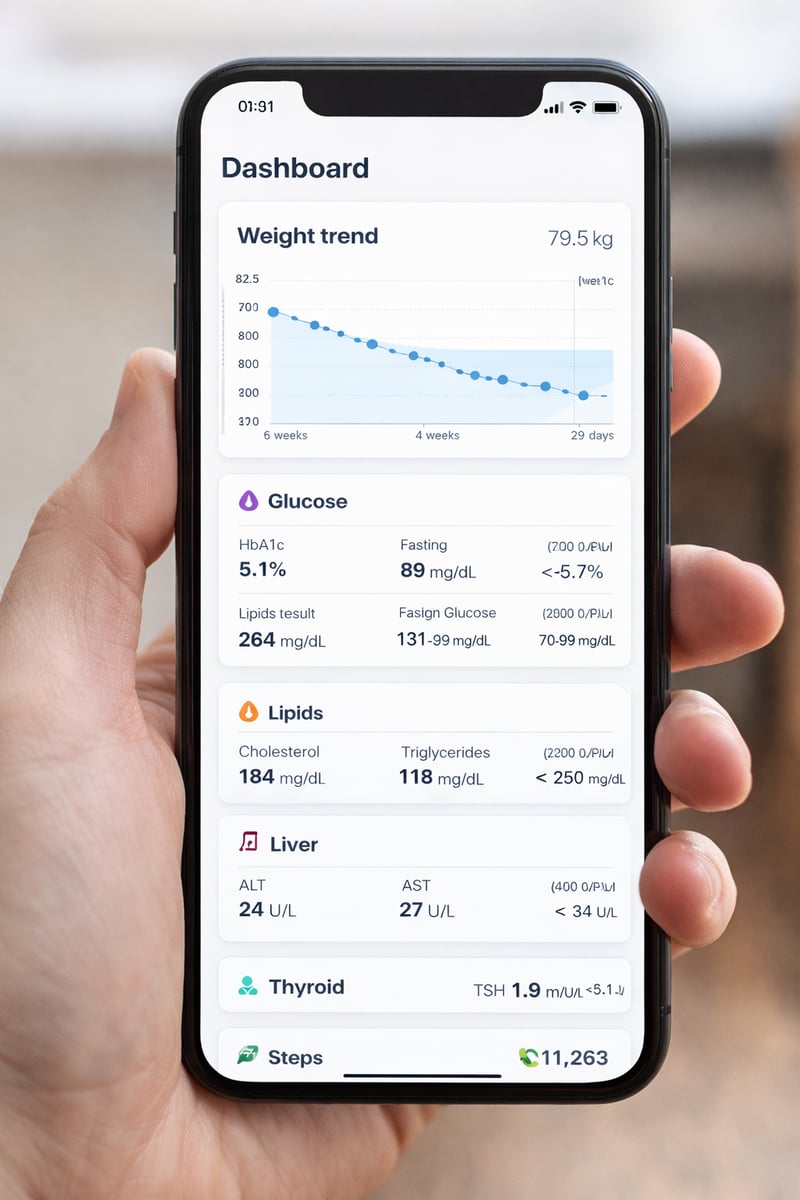
If you want faster, clearer progress, an app to track weight and lab results is one of the simplest upgrades you can make after 35. Research shows smartphone app interventions can produce modest but meaningful reductions in weight and BMI within 4 to 6 months, especially when tracking is consistent. This guide shows how to track the right metrics, how to interpret trends, and how Health360: Weight & Anti-Age keeps everything in one place.
Table of contents
- What problem does tracking weight + labs actually solve?
- Why track weight and lab results together?
- Which lab markers are worth tracking for weight and metabolism?
- How often should you weigh and update lab results?
- What else should you log besides weight and labs?
- What is a simple weekly routine you can stick to?
- What should a health app with lab integration include?
- How Health360: Weight & Anti-Age helps you track smarter
- What mistakes make people quit tracking?
- Is it safe to store lab results in an app?
- FAQ
What problem does tracking weight plus labs actually solve?
It turns “I feel off” into measurable signals, so you stop guessing and start adjusting based on trends. When your data is scattered (paper labs, photos in your gallery, weight in one app, notes in another), it is easy to miss the pattern that explains your plateau.
Plateau confusion is usually a data problem
If your weight stalls for 2 to 3 weeks, it does not always mean “nothing works.” It can be water retention, stress, sleep disruption, cycle changes, or inconsistent routines. Seeing weight alongside lifestyle context and lab markers makes the reason easier to identify.
Lab trends tell you if the plan is improving health, not only the scale
Weight is an outcome metric. Labs are “inside the body” metrics. Even when weight moves slowly, improvements in glucose control or lipid profile can signal your approach is working.
Tracking supports behavior change because it builds feedback loops
Many effective weight loss interventions include behavior change techniques such as self monitoring, feedback, and goal setting. Apps can support these techniques when the workflow is simple and consistent.
Why track weight and lab results together?
Because weight alone cannot explain metabolic progress, while labs alone cannot show day to day momentum. The combination is what creates clarity: the scale shows direction, and labs show how your body is responding internally.
Weight shows momentum, labs show metabolic response
- Weight trend: helps you spot progress vs noise (water shifts, travel, salty meals).
- Glucose markers: show whether cravings and energy swings are stabilizing.
- Lipids and liver markers: reveal improvements in cardiometabolic risk.
- Thyroid and iron status: can explain fatigue and low drive that block consistency.
Portals show numbers, but people still need interpretation
Many patients receive test results without clear explanation and end up searching online. A personal health metrics app that stores results with context helps you prepare better questions for your clinician.
One dashboard reduces “health admin” stress
For busy women, friction kills consistency. A weight and lab tracking app works best when it takes seconds, not minutes.
Quick comparison: weight only vs labs only vs combined
| Tracking style | What you learn | What you miss | Best for |
|---|---|---|---|
| Weight only | Direction and consistency | Metabolic changes and root causes | Daily accountability |
| Labs only | Internal health status | Daily behavior impact | Medical follow up |
| Weight + labs together | Progress plus reasons behind plateaus | Less guessing, better decisions | Long term results |
Which lab markers are worth tracking for weight and metabolism?
Start with glucose control, lipids, liver markers, thyroid basics, iron status, and inflammation signals, then personalize. You do not need 40 biomarkers to make progress. You need the right ones, consistently tracked over time.
Core lab markers (most common, high value)
- HbA1c: longer term glucose control (useful for appetite swings and energy stability).
- Fasting glucose: basic baseline; look at trend, not one value.
- Lipid panel: total cholesterol, LDL, HDL, triglycerides.
- Liver enzymes: ALT, AST (useful in metabolic health discussions).
- TSH (and free T4 if available): thyroid basics when fatigue is persistent.
- Ferritin and CBC: common reason for low energy and poor training tolerance.
Optional markers (choose based on symptoms and goals)
- Fasting insulin: helps discuss insulin resistance patterns with your clinician.
- hs CRP: inflammation signal (context matters, do not self diagnose).
- Vitamin D: useful if deficiency risk is high.
Make the app work for you: choose a “small set”
If you are overwhelmed, pick 6 to 10 markers and track them every time you test. Consistency beats complexity.
How often should you weigh and update lab results?
Weigh often enough to see trends, and update labs on your clinical schedule, usually every 8 to 12 weeks for active changes. The goal is trend visibility, not perfection.
Weight tracking frequency that reduces stress
- Best for trend accuracy: daily weigh ins, same time, same conditions.
- Best for low stress: 3 to 4 times per week.
- What to avoid: random times of day, because water shifts can mislead you.
Lab testing frequency (typical ranges)
- Every 8 to 12 weeks: when you are changing nutrition, sleep, or activity routines and want feedback.
- Every 3 to 6 months: maintenance monitoring, depending on your clinician plan.
Reminder rule
Choose one “lab review day” per week. Even if no new labs exist, you review trend lines and adjust small actions.
What else should you log besides weight and labs?
Log the minimum set that explains your results: sleep, steps, symptoms, and a few simple nutrition habits. This is where a personal health metrics app becomes a real decision tool.
The minimal “explanatory” metrics
| Metric | Why it matters | Simple target |
|---|---|---|
| Sleep | Impacts hunger cues, cravings, recovery | Consistent bedtime + 7 hours if possible |
| Steps | Low stress activity that supports fat loss | 10,000 steps per day (adjust if needed) |
| Symptoms | Fatigue, bloating, cravings explain stalls | Quick daily 10 second check in |
| Meals routine | Consistency beats “perfect” meals | 3 to 4 meals per day |
Keep food tracking simple
If logging food triggers stress, do not track every gram. Track the behaviors that move the needle: meal timing, protein presence, and low glycemic choices.
What is a simple weekly routine you can stick to?
A routine works when it is tiny, predictable, and measurable. Here is a simple workflow that fits busy schedules and still produces useful trend data.
Daily routine (2 minutes)
- Log weight (same time each morning if possible).
- Log steps at the end of the day.
- Choose 1 symptom to rate (energy, cravings, digestion, or sleep quality).
Weekly routine (10 minutes)
- Open your trend view and compare the last 7 days to the previous 7 days.
- If weight is flat, check sleep average and step average first.
- Pick one adjustment for the next week: earlier bedtime, higher step consistency, or simpler meals.
- Write a one sentence goal you will actually do.
Lab day routine (15 minutes)
- Add new results into your lab tracker (or import if available in your workflow).
- Compare to your previous test and flag changes you want to discuss.
- Connect the dots: what changed in sleep, stress, steps, or routine during the same period?
What should a health app with lab integration include?
The best apps make tracking feel effortless and make trends easy to understand. If you are choosing a weight and lab tracking app, use this checklist.
Non negotiable features
- Weight trend view (not only single entries).
- Lab results storage with dates and reference ranges.
- Notes or context (sleep, stress, steps, symptoms).
- Export or share so you can bring a summary to appointments.
- Reminders that are gentle, not spammy.
Features that increase adherence
- Goal setting and progress milestones.
- Personalized guidance (not generic advice).
- Simple dashboards that reduce decision fatigue.
Comparison: what most apps miss
| Feature | Typical weight apps | Patient portals | All in one tracker |
|---|---|---|---|
| Weight trends | Yes | No | Yes |
| Lab results history | Rare | Yes | Yes |
| Context (steps, sleep, symptoms) | Sometimes | No | Yes |
| Interpretation support | Generic | Often limited | Guided summaries |
How Health360: Weight and Anti-Age helps you track smarter
Health360 was built to keep your weight trend, lifestyle context, and health metrics in one clean system, so progress becomes visible. Instead of bouncing between apps, spreadsheets, and portal screenshots, you build one timeline.
Designed for consistency, not perfection
Health360 focuses on routines you can repeat. You see patterns over weeks, not only daily noise. That matters because app based weight interventions show the strongest benefits in the 4 to 6 month window when tracking is consistent.
One place for the story behind your numbers
- Weight logging with trend perspective.
- Space to store and review lab results over time.
- Habit context like steps, sleep, and symptoms, so plateaus make sense.
Try Health360
If you want an app to track weight and lab results without messy spreadsheets, start here: Download Health360: Weight & Anti-Age on Google Play.
What mistakes make people quit tracking?
Most people quit because tracking feels judgmental, time consuming, or confusing. Fix the system, and consistency becomes easier.
Mistake 1: tracking too many things
When you track 20 inputs, you eventually track none. Start with weight, steps, sleep quality, and 6 to 10 lab markers.
Mistake 2: reading single values instead of trends
A single weigh in or one lab value can be misleading. The point is direction over time.
Mistake 3: expecting the scale to match effort every day
Daily water shifts are normal. Use weekly averages and monthly patterns.
Mistake 4: not connecting labs to lifestyle
Labs are most useful when paired with sleep, stress, and movement context. Otherwise they are just numbers.
Is it safe to store lab results in an app?
It can be safe when you choose reputable tools, use strong passwords, and keep your device protected. Think of it like storing sensitive email: your habits matter.
Simple safety checklist
- Use a strong password and do not reuse it.
- Enable screen lock on your phone.
- Keep your operating system updated.
- Only upload what you need for tracking and clarity.
Medical note
This article is educational and does not replace medical advice. If a value is flagged abnormal, discuss it with your clinician.
FAQ
What is the best app to track weight and lab results?
The best app is the one you will use consistently. Look for weight trends, dated lab entries, context notes, and easy export. Health360: Weight & Anti-Age is designed around exactly that workflow.
Can an app really help with weight loss?
Yes, especially in the first 4 to 6 months. A recent systematic review and meta analysis found app based interventions produced statistically significant reductions in weight and BMI during that timeframe.
How often should I weigh myself?
Daily or 3 to 4 times per week is ideal. Pick the frequency that helps you see trends without stress.
How often should I repeat lab tests?
Commonly every 8 to 12 weeks when actively changing habits, then every 3 to 6 months for maintenance. Follow your clinician’s guidance for your situation.
Which labs matter most for fat loss and cravings?
HbA1c, fasting glucose, and a lipid panel are common starting points. Add thyroid or iron markers if fatigue and low energy are persistent.
What if my weight is not changing but labs improve?
That can still be meaningful progress. It often means your internal health is improving while weight is moving slower due to stress, sleep, water retention, or cycle shifts.
Do I need to track calories if I track labs?
No. Many people do better with routine based tracking: meal timing, protein presence, steps, and sleep consistency.
Where can I download Health360: Weight and Anti-Age?
References
- Pujia C, et al. The Role of Mobile Apps in Obesity Management: Systematic Review and Meta-Analysis. Journal of Medical Internet Research. 2025;27:e66887. DOI: 10.2196/66887. Read
- Li S, et al. Behavior Change Resources Used in Mobile App-Based Interventions Addressing Weight, Behavioral, and Metabolic Outcomes: Systematic Review and Meta-Analysis. PubMed record. Read
- Giardina TD, et al. Patient perceptions of receiving test results via online portals: a mixed-methods study. Journal of the American Medical Informatics Association. 2018;25(4):440-446. Read